Home › Explainers › What flight following does not do
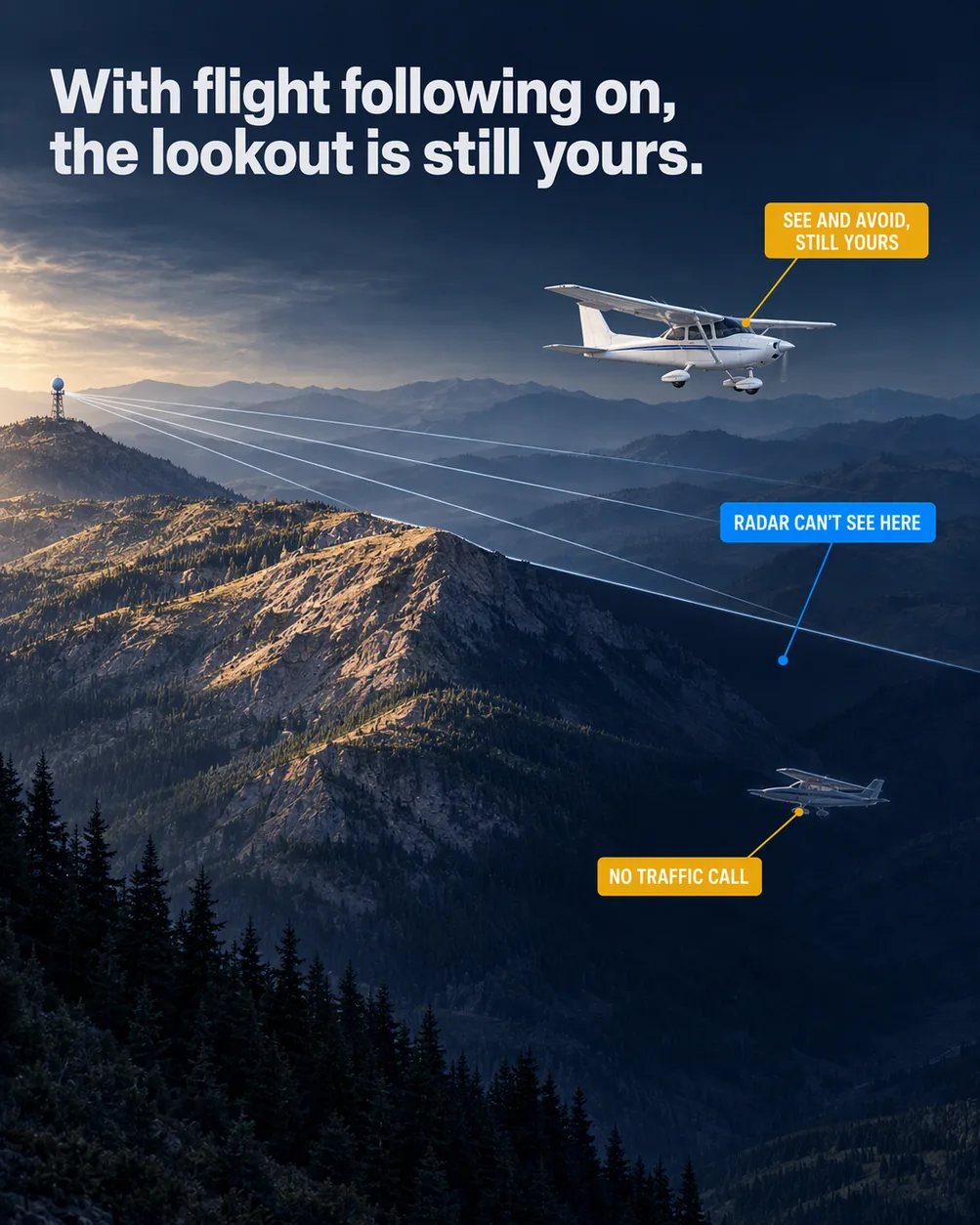
Flight following is a second set of eyes that can blink, so the lookout is still yours.
What the picture shows
The labels on the illustration, and what each one is pointing at.
- RADAR CAN'T SEE HEREThe shadowed wedge of the lee valley on the ridge's right side, just below the lowest radar line.
- NO TRAFFIC CALLThe ghost of the house aircraft climbing out of the shadowed lee valley.
- SEE AND AVOID, STILL YOURSThe house aircraft's windscreen.
The short version
Flight following is radar traffic advice that ATC gives a VFR pilot who asks for it. The controller tells you about targets close enough to your position or route to deserve a look. Some targets may never get a call, for reasons you can't see from the cockpit. Keep watching for other aircraft and keep clear of them yourself, all flight, because the service never takes that over.
Why a traffic call may never come
Picture a long, quiet stretch on frequency while you cruise with flight following. Nothing may be near you, or a call may have had no way to reach you.
Many things could stop a call. Among them are the radar's own limits, the volume of traffic, the controller's workload and a crowded frequency. A controller tied up with other airplanes, or a frequency with no gap to speak in, can leave your call unsaid.
The controller alone decides whether they can give the service, or keep giving it. They needn't tell you the reason, so the quiet doesn't tell you which case you're in.
Some traffic may not show on the screen at all. If part of the radar is out of service, ATC normally says so. Then the display shows only aircraft reporting through a transponder or ADS-B, and anything without them in use can't be called.
Why the clock position can be off
A call tells you where to look, on the 12-hour clock around your airplane. A typical one is traffic 10 o'clock, 3 miles, westbound, with distance in nautical miles. Type and altitude follow only if known.
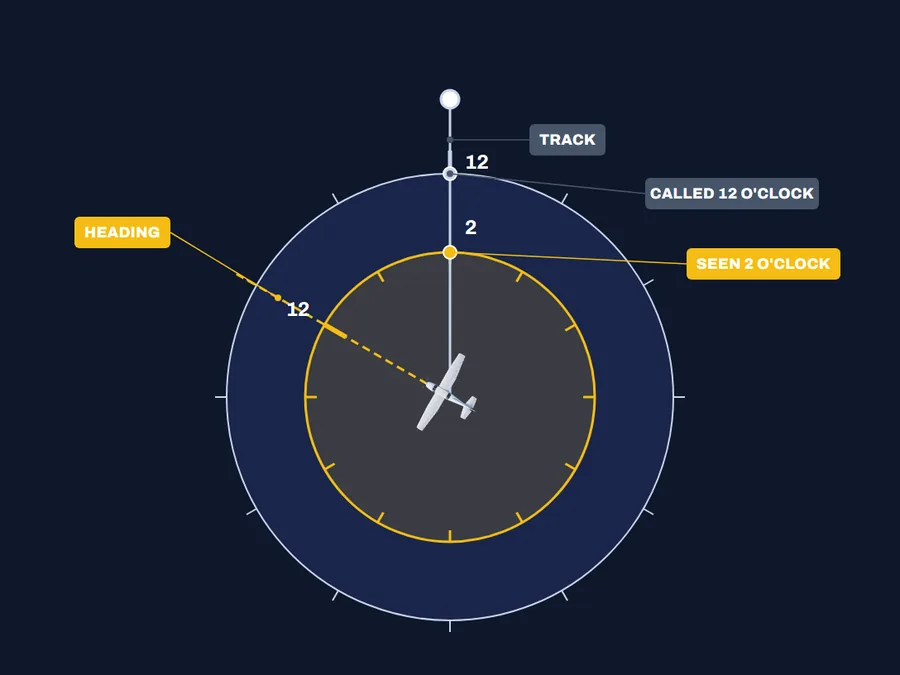
The controller sees only your track, the path over the ground, and never your heading, where the nose points. When you crab, angling the nose into the wind to hold your track, the two differ. Your clock turns with the nose, but the call's clock stays lined up with the track.
In the AIM's example, traffic called at 12 o'clock would appear at 2 o'clock to one pilot and 10 o'clock to another. A call of 2 o'clock would appear at 3 o'clock to a third.
A fourth pilot, needing no wind correction, would see the traffic right where it was called, at 11 o'clock. Turning just as a call comes in can throw it off the same way.
Altitude has its own gap. Radar gives none unless the other airplane has Mode C, the transponder feature that reports altitude, and the facility can display it.
Three mistakes with flight following
Keep scanning the whole sky after a call, well beyond the spot it named. A call covers one target the controller saw and had time to report, and others may be nearby with no call at all.
Treat a called altitude as a lead to confirm with your eyes. It may come from Mode C that nobody has checked against what that pilot reports.
Choose your own way to keep clear once you see the traffic. The service gives no vector, a heading to fly away from traffic, unless you ask for one. Even then, the controller gives it only as far as they can.
Check yourself
1. On a busy frequency, flight following has gone a long stretch without a traffic call, so can you treat the sky as clear?
2. You're crabbing with the nose left of your track when ATC calls traffic at 12 o'clock, so where should you look first?
3. ATC calls traffic with an altitude taken from its Mode C, so can you count on that altitude being right?
4. Traffic the controller called is in sight and closing, so should you hold your heading until ATC turns you?
Answers
1. No. A busy frequency is one of the things that can stop calls, and the controller needn't tell you why, so keep scanning.
2. Look right of the nose. The call's clock is set to your track, and your track runs right of where the nose points.
3. No. It may be unverified, so find the traffic and judge its height yourself.
4. No. Act to keep clear yourself as soon as you need to, because ATC won't turn you away from traffic on its own.
What this teaches
- Radar traffic information can be limited by the radar itself, the volume of traffic, controller workload and frequency congestion.
- The service does not relieve the pilot of the responsibility to see and avoid other aircraft.
Where to read more
Everything above rests on these. They are the FAA's own publications, free to read.
- Aeronautical Information Manual, paragraph 4-1-15Aeronautical Information Manual
Keep reading
- Pilot guideWhat NOTAMs to Check Before a Flight
- Pilot guideThe Go/No-Go Decision Framework
- Free toolVFR Nav Log Generator
Score the next flight before you go
FlightDecide reads the weather, the NOTAMs, your fuel and your weight and balance for the planned window, then scores them into a go / no-go call you can check against the raw data.
Get FlightDecide on the App StoreEducational content for pilots. It is advisory only and not a substitute for an official weather briefing, your POH, or your own judgment as pilot in command (14 CFR 91.3). The sources this explainer rests on are listed above.