New in the app · Results by area

Should you fly today? Get a second opinion.

FlightDecide checks your flight's weather, terrain, airspace, aircraft, and fuel against your airplane's numbers and your own minimums, then gives you one clear GO / CAUTION / NO GO and names the area that decided it, or the one to watch. Every reading is verifiable against the raw METAR, TAF, and NOTAM, and the final call is always yours.

  • Built for the marginal day: ceilings at 2,800 and forecast to lift, gusts near your crosswind limit
  • Free to try on iPhone, no account needed

Advisory decision support, not an official weather briefing. The pilot in command retains final authority (14 CFR 91.3).

The verdict now names
the area that decided it.

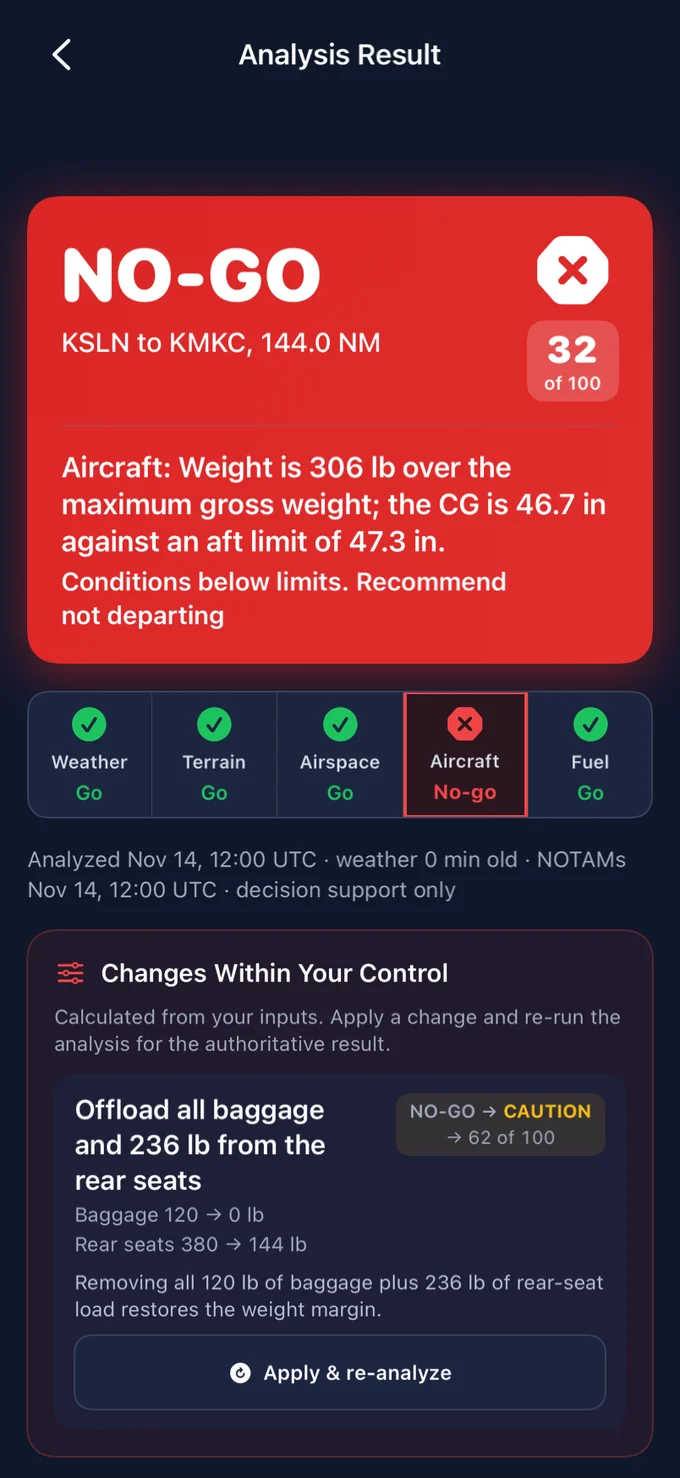
Analysis Result for KSLN to KMKC: a NO-GO verdict naming Aircraft (306 lb over maximum gross weight), the five-area strip with Aircraft marked No-go, and a change within your control that would bring it to CAUTION

Results are laid out by area now. On this KSLN to KMKC trip it's the airplane, 306 lb over max gross. Below the strip, the app projects the change that would make it CAUTION: offload all the baggage and 236 lb from the rear seats. Apply & re-analyze runs a fresh analysis with that change.

  • The eight scored categories, plus a terrain clearance check, now sit in five areas, in a strip that stays pinned to the top as you scroll.
  • Each area has its own card. Tap one for the detail, from the raw METARs and TAFs to the Airspace map with every TFR near your route.
  • Aircraft shows each weight and balance station and the ground roll. Fuel shows the burn by phase.
  • History, Weather Watch, and shared PDFs name the deciding area too.

New in version 1.3.3. Advisory only: verify against the raw data and your official briefing. The final call is yours.

Every pilot asks the same question
before every flight. We help you answer it.

Built for private pilots who want more than a gut check. FlightDecide pulls together weather, performance, fuel, and weight data into one scored verdict, so you can launch informed or stay on the ground for the right reasons.

Route Weather, Window-Aware

Departure, destination, and up to four enroute TAF checkpoints along your route. Each forecast is interpreted for your planned takeoff and arrival window: VFR, MVFR, IFR, or LIFR, with severe-weather flags called out. Times are shown in plain UTC, and the raw TAF is one tap away.

Enroute Picture in One Place

Winds aloft, freezing levels, G-AIRMETs, SIGMETs, and PIREPs along your route. When coverage is missing for part of your route, FlightDecide tells you so. You never see a silent "all clear" that came from no data.

One Fuel Plan, Fully Worked

Climb, cruise, and descent fuel computed from your aircraft's POH data, then legal reserve added on top. You see fuel on board, fuel required, reserve minutes available, and whether you meet the rule for your operation. VFR or IFR reserve rules under Part 91.

Performance and Weight & Balance

Takeoff and landing distances with margin against the available runway. Every weight and balance station is listed, and the total is checked against max gross. Your takeoff and landing CG are plotted on your aircraft's own envelope. Adjust passengers, bags, and fuel and watch the numbers move before you load the airplane.

TFRs and NOTAMs for Your Window

Tap the Airspace card for the map, every TFR with its floor, ceiling, and distance from your route, and every NOTAM in full. Each NOTAM also gets a plain-English summary and a window-impact line: in effect during your flight, starts after you land, or ended before takeoff. When NOTAM coverage is incomplete, the gap is called out instead of hidden.

Your Aircraft, Your Minimums

Build a profile around the aircraft you actually fly and the personal weather and fuel minimums you actually hold to. Every analysis is computed against your weights, arms, fuel arm, runway preferences, and weather floors. Not someone else's defaults.

Corrective Actions and Path to GO

Every analysis lists ranked Required and Recommended steps with specific numbers: exact lbs to shift, altitude to request, fuel to add. For CAUTION and NO GO flights, Path to GO highlights the smallest set of changes that would flip the verdict.

Optimal Cruise Altitude

Winds aloft scored at every candidate cruise altitude for winds, icing, turbulence, and ceiling clearance, then constrained to the hemispheric rule for your direction of flight. FlightDecide tells you which altitude gives the best ride and why.

Aviation Tools, Classic and Visual

The Tools tab is a collection of aviation tools in two modes. Classic is a full flight computer: wind triangle and wind correction, heading and groundspeed, density altitude, true airspeed, fuel, timers, conversions, and weight and balance. Visual covers crosswind with a METAR reader, holding entries, descent and glide, and a trip planner. It all works offline. It comes with the Tools plan, first month free, or with Pro. Many of the same calculations run free in your browser at flightdecide.com/tools.
A clear flight picture
in three steps.

No juggling six apps to assemble the picture yourself. FlightDecide pulls it together and scores it, then you verify against the raw data and your official briefing.

Enter your route, aircraft, and departure

Set departure, destination, alternates, and your planned departure time. Choose your aircraft from the built-in library or build a profile around the one you actually fly. Add passengers, bags, and fuel load.

We pull weather, NOTAMs, and compute the numbers

Live METARs, TAFs along the route, winds aloft, freezing levels, G-AIRMETs, SIGMETs, and PIREPs. NOTAMs filtered by your flight window. Weight and balance, takeoff and landing distances, and the full fuel plan computed from digitized POH data for your aircraft type. Weather comes live from the NOAA Aviation Weather Center (aviationweather.gov), and NOTAMs from FAA data, at the moment you run the analysis. Each scored category produces ranked corrective actions you can act on.

Read the verdict, scan the briefing, verify the raw data

The verdict comes with its reason: the area that set it, or on a GO, the one to watch. A strip under it shows all five areas, and each has its own card below. An AI briefing in plain language explains the risk and points out the items worth a second look. Every interpretation is backed by the raw METAR, TAF, or NOTAM so you can verify it yourself. You make the final call.

Your whole flight,
in one picture.

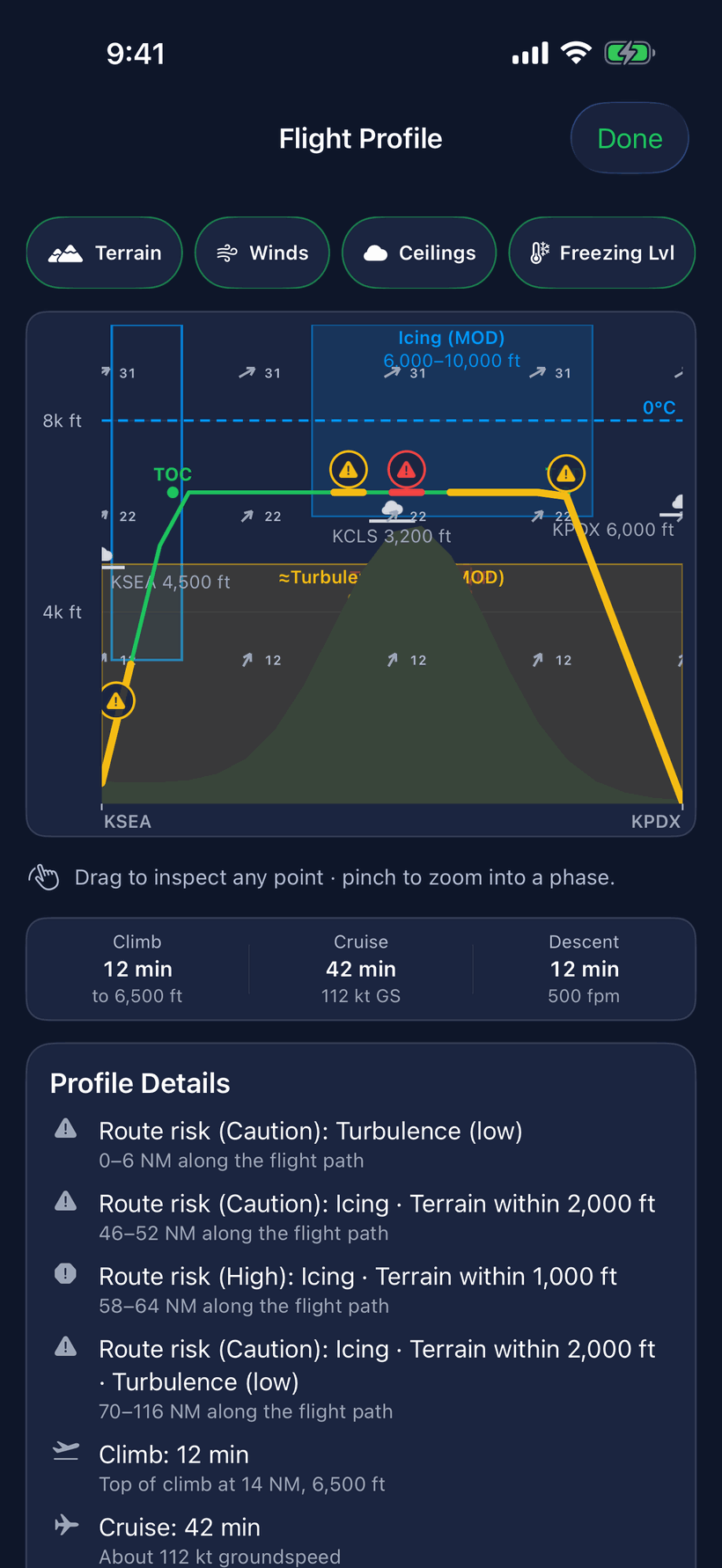
Flight profile for KSEA to KPDX: an altitude cross-section over terrain with wind barbs at each level, icing and turbulence bands, ceilings, the freezing level, and labeled climb, cruise, and descent phases

Terrain, winds aloft, icing and turbulence bands, ceilings, and the freezing level for KSEA to KPDX, drawn against your climb, cruise, and descent. The picture you'd normally stitch together across a handful of tools is already here, on one screen.

  • Every phase timed out: climb 12 min to 6,500 ft, cruise 42 min at 112 kt GS, descent 12 min.
  • Per-segment risks called out along the route, like Icing (MOD) 46-52 NM and terrain within 2,000 ft.
  • Drag along the route to read the numbers at any point. Toggle terrain, winds, ceilings, and the freezing level.

Advisory only. Verify against the raw data and your official briefing. The final call is yours.

Try a real briefing,
right in your browser.

Pick a sample flight and get the scored advisory FlightDecide produces: enter the route, read the verdict, then open the raw METAR, TAF, and NOTAM behind every call.

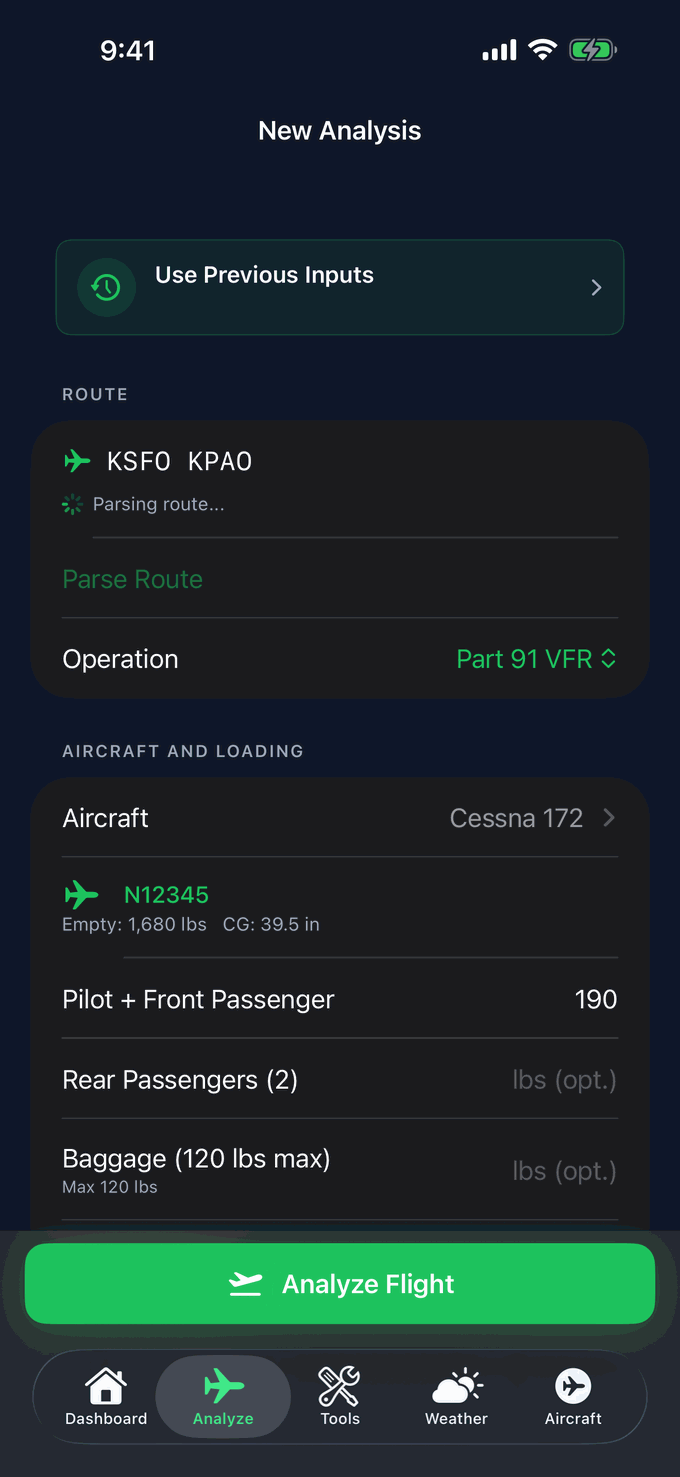
New Analysis form for KSFO to KPAO with a Cessna 172 (N12345) and a green weight and balance summary
Enter your route, aircraft, and planned departure. Weight and balance checks green before you go.
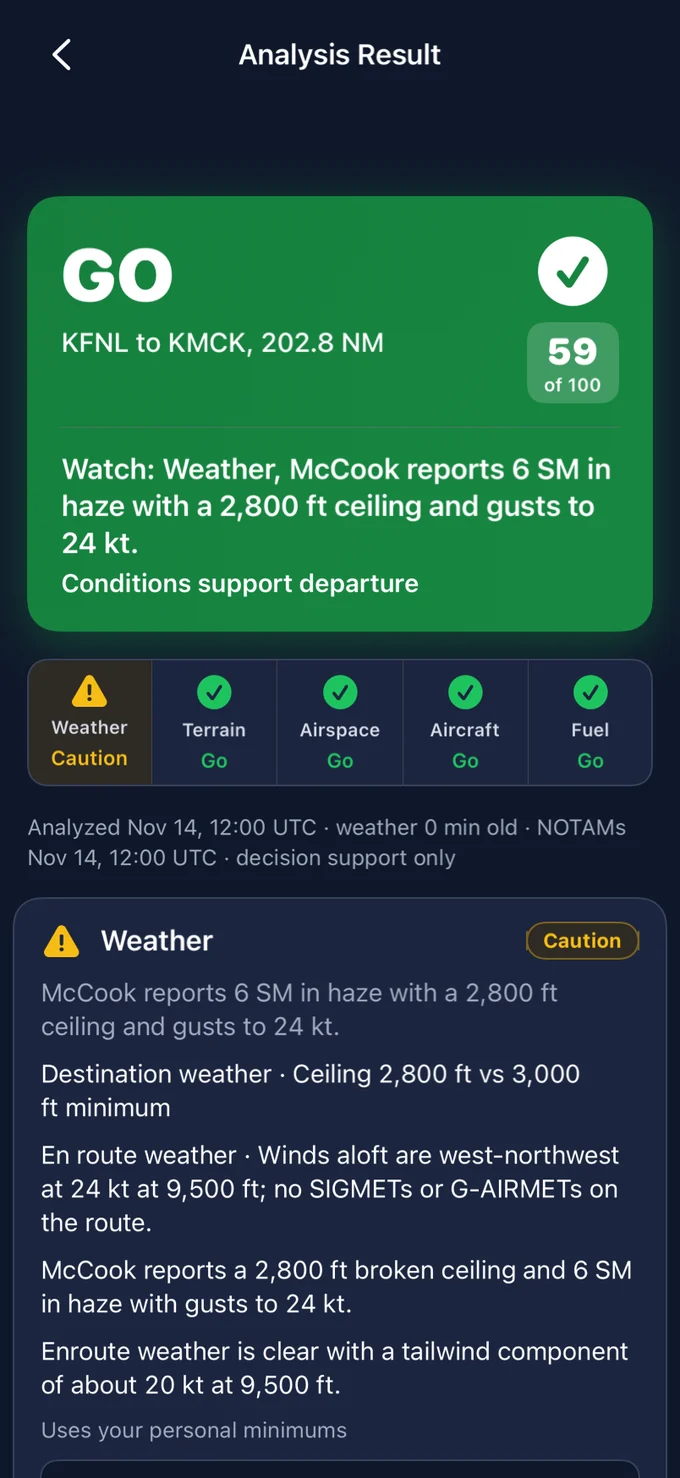
Analysis Result for KFNL to KMCK: a GO verdict with a Watch line naming Weather (6 SM in haze, a 2,800 ft ceiling and gusts to 24 kt at McCook), and the five-area strip with Weather marked Caution
A marginal day on another sample flight, KFNL to KMCK: the verdict names Weather as the area to watch, with all five areas in the strip under it.
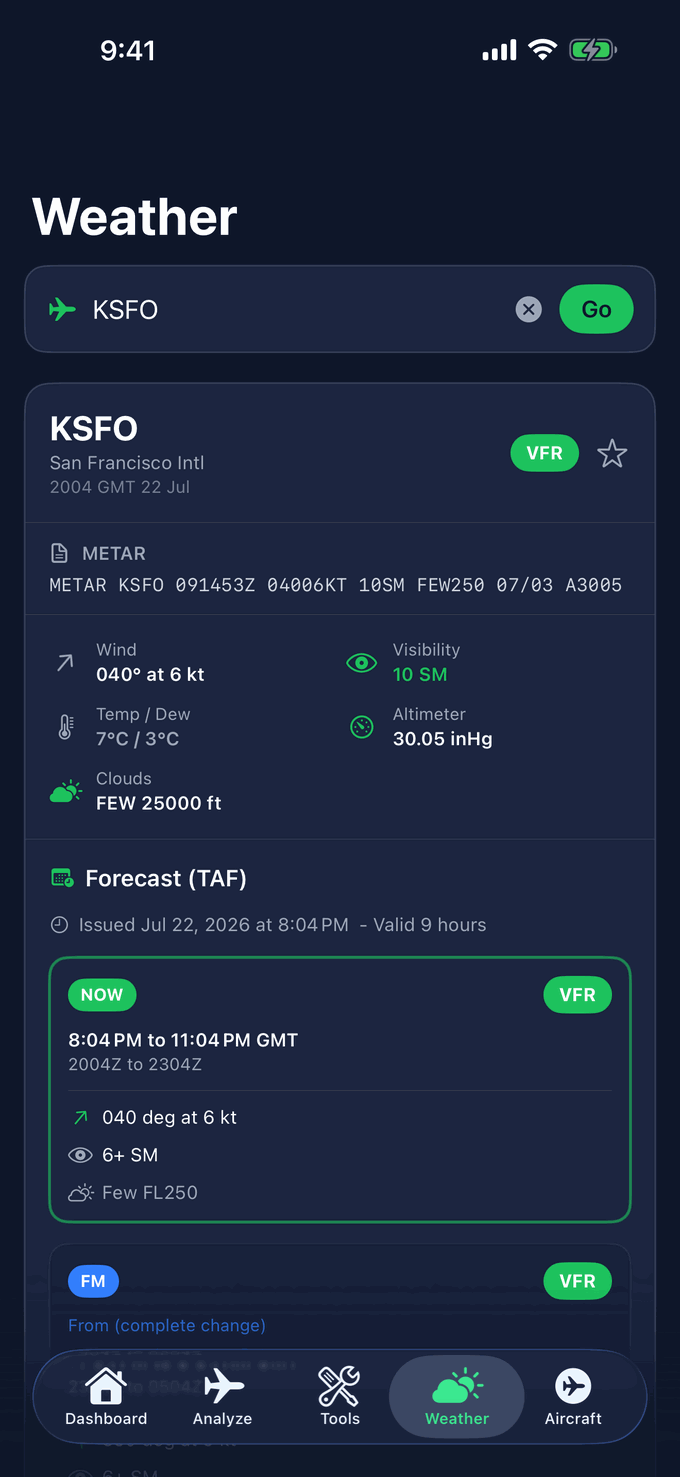
Weather tab for KSFO showing a VFR chip and a decoded METAR and TAF, with the raw text one tap away
Decoded METAR and TAF for the station, with the raw text one tap away so you can check it yourself.

Keep your EFB.
Add a second opinion.

You already use ForeFlight or Garmin Pilot. FlightDecide doesn't replace them. It answers the one question they leave to you.

Your EFB shows you everything

ForeFlight and Garmin Pilot are where you plan, brief, and file: charts, weather layers, and raw METARs, all in one place. Then it's on you to synthesize it into a go/no-go call.

FlightDecide answers one question

Should you fly? It cross-checks weather, NOTAMs, fuel, performance, and weight and balance against your aircraft's POH numbers and your personal minimums, scores eight risk categories, and shows its reasoning.

It complements your EFB and your official briefing. It replaces neither, and it doesn't overlap with your subscription.

Built for the aircraft you actually fly

A growing library of GA aircraft with real POH performance data behind every fuel and performance calculation. From your first solo to your first jet. Don't see your aircraft? Build a profile with your own performance numbers and personal minimums.

Trainers
Cessna 150, 152, 172, Diamond DA20, and more
Where every pilot starts
Single Engine
Cherokee, Archer, Skylane, Bonanza, Cirrus, and more
Cross country and beyond
Utility and Bush
Stationair, Super Cub, Skywagon, Cherokee Six
Work hard, fly far
Twin Engine
Seminole, Baron, Seneca, Twin Star, Duchess
Double the engines, double the capability
Turboprop
King Air and more
High performance, high altitude
Jets
Citation CJ3, Vision Jet, and more
Go fast, go far
40+
Aircraft Types
And growing
POH
POH-Derived Data
Digitized from published POH tables. Verify against your aircraft's POH
∞
Custom Profiles
Import your own aircraft

Don't see your aircraft? Build a custom profile with your own performance data.

Set up your aircraft

Fly as much as you want.
Start free, upgrade when you're ready.

Three analyses a month on the free tier. Unlimited on Pro.

ForeFlight's plain-English NOTAM AI moved to Premium on November 4, 2026, when its free trial ended. Premium runs $390 USD/yr, which is $130 USD/yr more than Essential (ForeFlight tier pricing checked July 2026). FlightDecide reads the weather, the NOTAMs, and your airplane's real numbers, checks them against your personal minimums, and gives you a straight go/no-go answer.

Free
$0
No payment details needed.
  • 3 analyses a month
  • 1 flight monitor
  • Built-in aircraft library, plus your own aircraft profiles
  • Live weather data
  • GO / CAUTION / NO GO verdict
  • 8 category scoring

Free doesn't include the Tools tab or Fleet, and it stops at 3 analyses a month.

Get Started
Tools
$1.99 USD/mo
or $19.99 USD/yr (save 16%)
First month free
The app's Tools tab: a collection of aviation tools.
  • Classic: a full flight computer
  • Visual: crosswind with a METAR reader, holding entries, descent and glide, trip planning
  • Weight and balance and unit conversions
  • Works offline

Analyses stay at 3 a month, as on Free.

Get the App

All plans start in the free app. The free month on Tools is Apple's introductory offer, one per Apple ID, and Tools then renews at the price you picked unless you cancel. Every price on this page is in US dollars; the App Store charges the equivalent in your own currency, so check the price shown in the app before you buy. Subscriptions are billed through the App Store and can be cancelled anytime in your Apple account settings.

Ready to fly
better informed?

FlightDecide is now on the App Store. Download it for iPhone and start free, no commitment. A clearer go/no-go picture starting with your next flight, and the final call still yours.

Download on the App Store Try the interactive demo

Free to start. Requires iOS 17 or later. FlightDecide is advisory only and complements, never replaces, an official briefing.